

Free Power BI Dashboard Templates for NetSuite
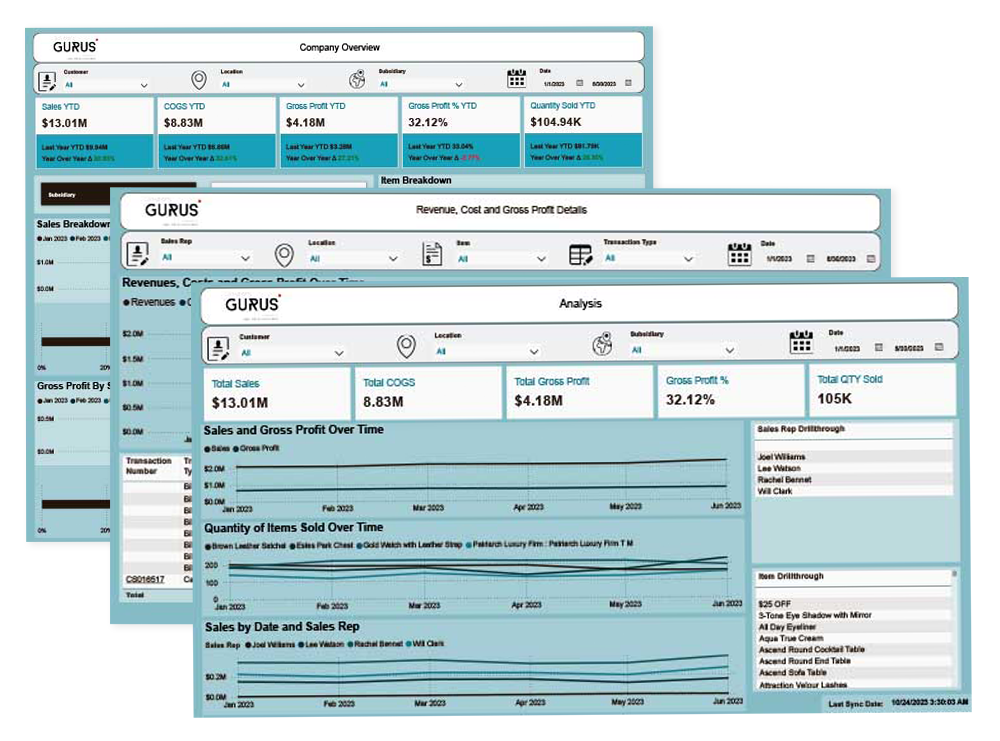
Looking to explore the power of NetSuite reporting with Power BI? Start with a free sample of our dashboard templates designed for fast deployment, executive insights, and deep transactional analysis.
This sample PBIX file offers a glimpse into what’s possible with our full Power BI dashboard suite for NetSuite.
Complete the form to download and explore a free sample of our NetSuite Power BI templates
Get a Free Sample Power BI Template for NetSuite
Enter your business email to instantly download the sample.
What You’ll Get
Here’s how these templates can empower your reporting:

Fully Customizable
All DAX measures unlocked—tweak visuals, themes, and calculations.
Save Hours of Work
Skip the blank-canvas build, deploy and analyze in minutes.
Instant Executive Insights
See Top-line KPIs (Sales, Profit, Growth) at a glance.
Dynamic Filtering
Slice & dice by Customer, Location, Subsidiary, Rep, or Date.
Drill-Through Details
One-click into transaction-level tables for deeper analysis.

Executive Overview
A consolidated dashboard with top-line KPIs (Sales YTD, COGS YTD, Gross Profit YTD & %), trend lines, and year-over-year variance to instantly gauge overall performance.
GL & Cash-Flow Drill-Through
A waterfall chart mapping Revenues, Costs, and Gross Profit, plus one-click drill-through into detailed transaction tables.


Subsidiary & Customer Breakdown
Interactive pie and bar charts showing Sales by Parent Company and Gross Profit by Subsidiary, with slicers for Customer, Location, Subsidiary, Sales Rep, and Date.
Transaction Detail Table
A fully filterable table listing transaction number, date, item, location, sales rep, quantity, and amount—complete with YTD vs. last-year comparisons.

Get a Free Sample Power BI Template for NetSuite
Enter your business email to instantly download the sample.
Frequently Asked Questions
Why should I integrate Power BI with NetSuite, and what are the general benefits?
To gain deeper insights from NetSuite data. Benefits include enhanced visualizations, advanced analytics, unified data views, real-time insights, and customizable, sharable reports.
What are the common methods for connecting Power BI to NetSuite data?
NetSuite RESTlets/SuiteTalk API, more robust third-party integration tools - like GURUS AI for NetSuite, NetSuite SuiteAnalytics Connect, or less ideally, Web Query Reports.
How does GURUS AI for NetSuite specifically facilitate Power BI integration?
It provides a specialized connector to extract and optimize NetSuite data into a dedicated data warehouse, then makes this analytics-ready data accessible for Power BI reporting. In addition, 30+ Power BI report templates are delivered accelerating deployment.
What are the key features of GURUS AI for NetSuite that enhance Power BI reporting?
Seamless data connection, data optimization, a customizable data warehouse, pre-built templates, data security, and support for integrating multiple data sources.
Can GURUS AI for NetSuite handle historical data and provide automated refreshes for Power BI?
Yes, it handles historical data migration and provides automated, continuous data updates to the data warehouse, enabling Power BI to refresh reports with the latest information.