

Table of Contents
- AI in NetSuite Has Reached an Inflection Point
- NetSuite's Native AI: What Oracle Gives You Out of the Box
- NetSuite Next: Oracle's AI-Native Vision
- Extending NetSuite AI Today: AI4NetSuite by GURUS
- The Visualization Layer: Choosing the Right Tool
- AI in Action: Real Use Cases Across Industries
- Building Your AI Strategy: What to Do Now
- Frequently Asked Questions
- How GURUS Solutions Can Help
Request More Info About How to Connect Your NetSuite Data to Any LLM
AI in NetSuite Has Reached an Inflection Point
For years, "AI in NetSuite" meant a handful of modest features, auto-populated fields, basic text suggestions, and a bill capture tool that sometimes worked. Useful, but nothing that fundamentally changed how you ran your business.
That era is over.
As Neil Stolovitsky, Director of Products & Solutions Consulting at GURUS Solutions, puts it: "For decades, Business Intelligence promised data freedom but delivered a cycle of waiting on IT. Today, that cycle is over."
In the past twelve months, two things happened simultaneously. Oracle unveiled NetSuite Next, a ground-up reimagining of the platform with AI woven into its core, and the ecosystem of third-party AI extensions matured to the point where NetSuite users can now access production-grade machine learning, anomaly detection, predictive forecasting, and conversational AI without waiting for Oracle's roadmap to fully materialize.
The result is a landscape that's genuinely exciting but also genuinely confusing. What's real today? What's still vaporware? Where should you invest your time and budget right now, and what can wait?
This guide answers those questions. We'll walk through every layer of AI available to NetSuite users in 2026, from Oracle's native features to the SuiteCloud developer ecosystem to purpose-built extensions like AI4NetSuite, with honest assessments of maturity, ROI, and implementation effort at every step.
NetSuite's Native AI, What Oracle Gives You Out of the Box
The Original Native Features
NetSuite has included a small set of AI-powered features for several years now. Understanding what these do, and what they don't, is the starting point for any AI strategy.
- Text Enhance uses generative AI to help users draft and refine text within NetSuite records. It's functional for what it does, but its scope is narrow: it helps you write text faster, not make better business decisions.
- Bill Capture uses optical character recognition (OCR) and machine learning to extract data from vendor bills. Many organizations find they still need a human review step.
- Intelligent Predicted Fields suggest values for certain fields based on historical patterns. These work best when your data is clean and your processes are consistent.
The Honest Assessment
These native features share a common trait: they're point solutions. Each one addresses a specific, narrow task. None of them give you the ability to forecast business trends, detect anomalies across your data, build custom dashboards driven by machine learning, or interact with your ERP data conversationally. They're useful additions to the platform, but they don't constitute an AI strategy. For organizations that need AI to move the needle on decision-making, reporting, and operational efficiency, native features are a starting point, not a destination.
NetSuite Next, Oracle's AI-Native Vision
What NetSuite Next Actually Is
In late 2025, Oracle unveiled NetSuite Next: a next-generation version of the platform built with AI at its architectural core rather than bolted on as an afterthought. This isn't a minor feature update, it's the most significant reimagining of NetSuite since its inception. The headline capabilities include:
- Ask Oracle introduces conversational AI and natural-language search directly into the ERP. Users can query and act on data in plain English, "show me overdue invoices from Q4" or "which vendors have the highest spend this year", without building saved searches or navigating complex report builders. For non-technical users, this is potentially transformative.
- Agentic Workflows (SuiteAgents) go beyond simple automation. These AI agents can propose actions, monitor conditions, and automate multi-step processes across finance, operations, and supply chain. Imagine an agent that tracks project costs against milestones, flags overruns before they hit the P&L, and drafts adjustment recommendations for your review, that's the vision.
- The Upgrade Path is designed to be seamless. NetSuite Next isn't a separate product requiring migration. It's rolling out as an activation within existing accounts, with customizations, data, and SuiteApps remaining compatible. Oracle has stated this rollout will cover North America within the next twelve months.
The SuiteCloud Developer Ecosystem Gets Smarter
Alongside NetSuite Next, Oracle upgraded the SuiteCloud Developer Network (SDN) with several AI-focused tools:
- AI Connector Service lets organizations bring their own AI models or LLMs and connect them securely to NetSuite data. This is significant because it opens the door for organizations to use tools like Claude, ChatGPT, Gemini or custom ML models with their ERP data without building fragile integrations from scratch.
- SuiteAgents Framework give developers the building blocks to create intelligent workflows, document-AI tools, and automated summaries within the SuiteCloud environment.
- AI Studios provides no-code tools for tuning prompt behavior and narrative insights, making AI accessible to functional consultants and admins, not just developers.
- AI Elite Partner Tier recognizes ISVs and partners specializing in AI SuiteApps, creating a formal ecosystem for AI innovation on top of NetSuite.
For a deeper look at the NetSuite Next announcement and what it means for the ecosystem, read our full breakdown: NetSuite AI Update: What's New with NetSuite Next
The Honest Assessment
NetSuite Next is genuinely exciting, and we say that as a team that's spent 20 years building on this platform. The vision of conversational ERP, agentic workflows, and a developer ecosystem built for AI is exactly where enterprise software needs to go.
But here's the reality check: much of this is still rolling out. Some AI features and developer tools are live today; the full release is a 12-month horizon. Ask Oracle is impressive in demos but hasn't been battle-tested at scale across diverse, heavily customized NetSuite environments. SuiteAgents are a framework, not a finished product, building useful agents requires development time, clean data, and well-defined processes.
The practical question for most organizations isn't "Is NetSuite Next good?", it clearly is. The question is: “What do I do between now and when all of this is production-ready?”
That's where the extension ecosystem comes in.
Extending NetSuite AI Today, AI4NetSuite by GURUS
Why Extending Beats Waiting
The gap between what NetSuite offers natively and what most organizations need from AI is real. You need forecasting engines that analyze historical data and market trends.
You need anomaly detection that catches errors before they cascade. You need dashboards that update in real time and don't require a SuiteAnalytics certification to build. You could wait for NetSuite Next to deliver all of this. Or you could extend your current environment with tools that are production-ready today and will integrate with NetSuite Next features as they launch.
That's the approach we built AI4NetSuite around.
What AI4NetSuite Actually Does
- AI4NetSuite is a proprietary AI and machine learning extension built by GURUS Solutions specifically for the NetSuite ecosystem. It goes beyond native features by introducing four core capabilities:
- Machine Learning-Powered Forecasting: The forecasting engine analyzes historical data, market trends, and other relevant factors to deliver accurate predictions about business performance. This isn't a simple trend line extrapolation, it's ML-driven analysis that identifies patterns humans miss and surfaces trends that directly impact the bottom line. Finance teams use it for revenue forecasting, operations teams for demand planning, and executives for strategic resource allocation. Neil Stolovitsky, Director of Products and Solutions at GURUS, describes the underlying architecture: “The secret sauce to AI4NetSuite is our robust data model, enhanced with your custom records and fields. It is evolving, scalable, and fully documented. We have already mapped complex NetSuite relationships, such as multi-currency and intricate transaction links, so you don't have to.”
- Advanced Anomaly Detection: AI4NetSuite continuously monitors your data for outliers, inconsistencies, and patterns that deviate from expected norms. This catches everything from duplicate vendor records and miscoded transactions to emerging issues in procurement patterns, before they become problems that require expensive cleanup. Think of it as an always-on data quality and risk monitoring layer.
- Fully Customizable Dashboards: Unlike native NetSuite dashboards or SuiteAnalytics workbooks, AI4NetSuite's dashboards are designed for flexibility without complexity. Business users can build and modify views without technical expertise, while power users can go deep with advanced configurations. The dashboards are driven by AI-generated insights, not just static data displays.
- Google Data Warehouse Pipeline: AI4NetSuite seamlessly transfers your NetSuite data to a Google-powered data warehouse, making it available for visualization in your preferred tools. This is where the integration story gets compelling: you can connect Tableau, Power BI, or Looker Studio to your warehoused NetSuite data and layer AI-driven insights on top.
And here's a detail worth highlighting: Looker Studio is included at no additional charge with AI4NetSuite. While Tableau and Power BI require separate licenses, AI4NetSuite gives you a production-ready visualization layer out of the box.
How It Integrates
The integration model is designed to be non-disruptive:
-
Install the AI4NetSuite extension within your existing NetSuite environment
-
Connect your NetSuite instance to a Google-powered data warehouse
-
Integrate your preferred visualization tool, Looker Studio (free), Tableau, or Power BI
-
Start automating data-driven decision-making within your existing workflows
There's no system overhaul, no workflow disruption, and no extensive retraining required. Your team continues operating in their familiar NetSuite environment while gaining access to advanced AI capabilities. Most organizations see immediate benefits, faster reporting, automated insights, improved forecasting, from the first week.
For a deeper look at how the data warehouse pipeline works: Multi-Source Advantage: Giving LLMs Full Context
For a comparison of visualization options: LLM vs. Dashboard Reporting in NetSuite
The Visualization Layer, Choosing the Right Tool
Your AI is only as useful as your ability to see and act on its outputs. Choosing the right visualization tool to pair with your NetSuite AI stack is a strategic decision.
Here's how the three major options compare when connected to NetSuite data through AI4NetSuite's Google Data Warehouse pipeline:
Tableau
-
Ease of Use: Visual drag-and-drop workflow interface. Widely regarded as the most intuitive for data exploration. Integrations: Connects to a wide range of data sources including Salesforce, Shopify, and more. Strong but can be complex to configure.
-
AI Integration: Tableau GPT offers an AI experience built directly within Tableau.
-
AI Visualization: Tableau Pulse delivers automated data analytics in plain language.
-
Responsible AI: Layered with Einstein GPT for trusted, ethical AI experiences.
-
Pricing: Part of the Tableau suite, with license-dependent pricing. Typically requires a sales conversation.
Looker Studio
-
Ease of Use: Intuitive drag-and-drop interface. Lightweight and fast to deploy.
-
Integrations: Tight integration with Google Cloud, Sheets, and Google BigQuery, which is the backbone of AI4NetSuite's data warehouse.
-
AI Integration: Access to AutoML and Google Cloud's Vertex AI for advanced capabilities.
-
AI Visualization: Dashboards can be enhanced through external AI solutions.
-
Responsible AI: Google's AI Principles have guided responsible development since 2018.
-
Pricing: Available at no charge and included with AI4NetSuite, Powered by GURUS.
Power BI
-
Ease of Use: Spreadsheet-like interface that feels familiar to Excel users.
-
Integrations: Strong integration with the Microsoft stack, Excel, Teams, Azure.
-
AI Integration: AI insights available in Power Query Editor, plus Azure ML for advanced analysis.
-
AI Visualization: Azure Cognitive Services algorithms for text analytics and vision.
-
Responsible AI: Microsoft operates under six guiding principles for ethical AI use.
-
Pricing: Part of the Microsoft Power BI suite, with license-dependent pricing.
For organizations already invested in Salesforce, Tableau is a natural fit. For Microsoft-heavy environments, Power BI makes sense. But for NetSuite users adopting AI4NetSuite, Looker Studio offers the path of least resistance, it's free, natively integrated with the Google Data Warehouse that powers AI4NetSuite, and requires no additional licensing. You can always layer Tableau or Power BI on top later as needs evolve.
(For a detailed comparison with implementation guidance: Connect your NetSuite data to any LLM (ChatGPT/Claude/Gemini)
AI in Action: Use Cases and Product Demo’s
AI in NetSuite is no longer theoretical. It is being operationalized across industries right now. GURUS Solutions demonstrates the power of cross-platform AI in its own product demonstrations.
In a recent AI4NetSuite demo, the team joined NetSuite financial data with Zendesk support data through a common key and prompted Claude to identify the top 40 organizations representing 80% of total revenue. As Neil Stolovitsky, Director of Products, explains: “Behind the scenes, the AI performed a complex join, calculated cumulative revenue thresholds, and isolated our most critical customers in a ready-to-read dashboard.”
The analysis went further. By layering sentiment and risk scoring across four dimensions, including priority, open tickets, resolution time, and recency, the team uncovered that a top revenue customer carried a risk score of 57 due to slow resolution times, while another critical account hit a risk score of 61 with an average support wait time of 18 days. As Neil noted: "Without this AI join, these retention risks would be completely invisible to the finance team."
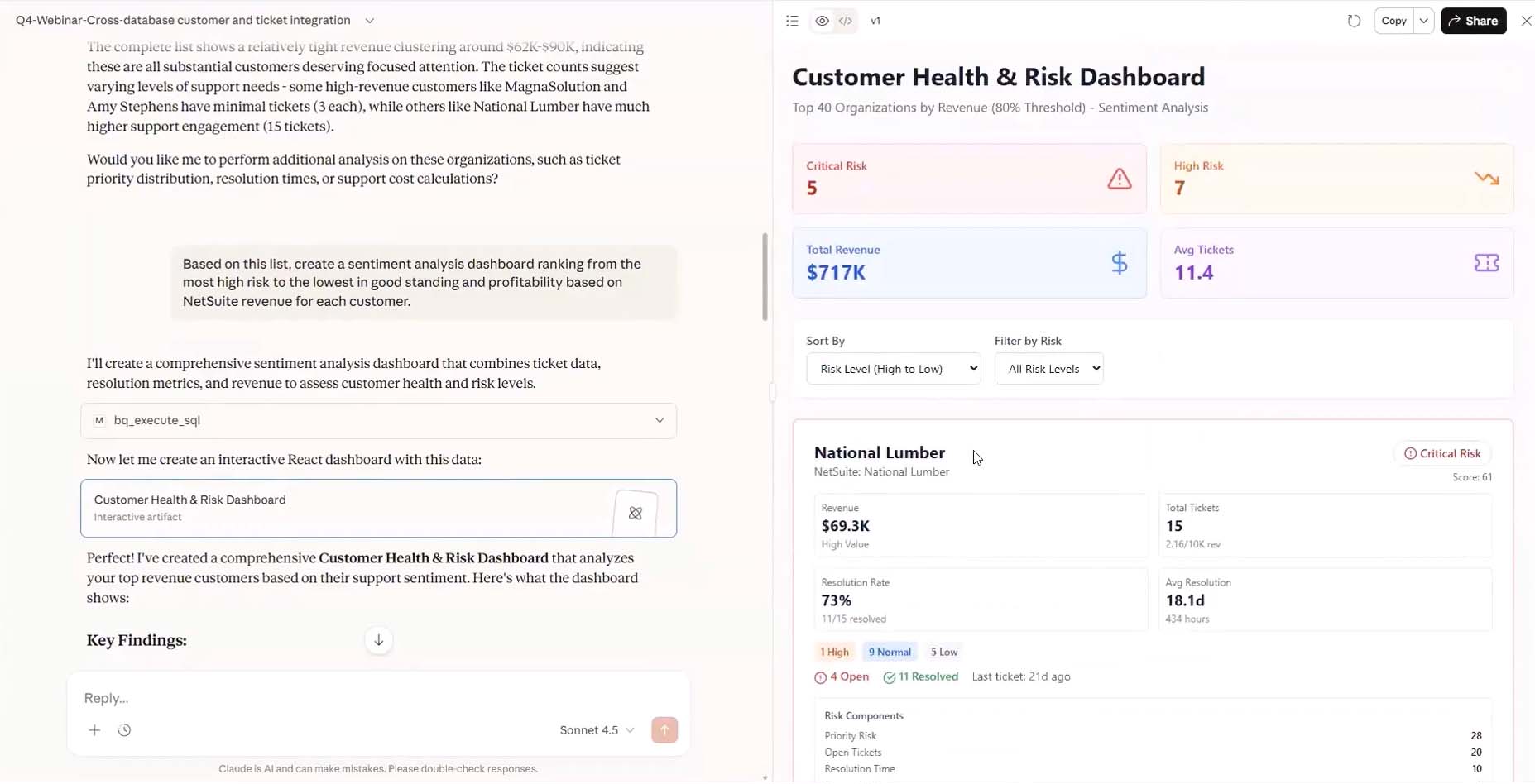
AI4NetSuite sentiment analysis dashboard mining both NetSuite financial data and Zendesk support data to surface retention risk.
The demo also revealed how AI reframes profitability. Using an integrated blended support cost of $75 per hour, the team calculated true customer profitability. One customer generating $11,900 in revenue had consumed 31 hours of support across 15 tickets, meaning nearly 20% of his revenue was drained by support costs.
By contrast, another customer maintained a 99.4% margin with almost no support overhead. That gap between surface-level revenue and true profitability is exactly the kind of insight that changes how leadership allocates resources.

AI4NetSuite true profitability analysis revealing hidden support costs that change the financial picture.
These are not pilot programs or proof-of-concepts. They are production deployments delivering measurable ROI.
The industries seeing the most immediate impact include finance, manufacturing, retail, professional services, and SaaS. Essentially, any business that relies on NetSuite for daily operations benefits from AI-driven forecasting, automation, and decision support.
For more on how AI is reshaping specific industries: [How NetSuite AI Will Transform Your Industry].
For the competitive landscape: The Future of AI in NetSuite ERP
Building Your AI Strategy, What to Do Now
Step 1: Assess Your Readiness
Before investing in any AI tool, understand where you stand. Key questions to answer:
-
Data quality: Is your NetSuite data clean, consistent, and well-structured? AI models are only as good as the data they're trained on. Duplicate vendors, miscoded transactions, and inconsistent naming conventions will undermine any AI investment.
-
Process maturity: Are your workflows well-defined and consistently followed? AI can automate and optimize processes, but it can't fix processes that don't exist or aren't understood.
-
Governance: Do you have clear ownership of data, processes, and AI initiatives? Without governance, AI projects stall or produce insights that nobody trusts.
Step 2: Start With Quick Wins
Don't try to boil the ocean. The highest-ROI AI deployments we've seen start with specific, measurable use cases:
-
If your reporting is slow, manual, or requires specialized skills: Start with AI4NetSuite's dashboards and automated reporting. The Google Data Warehouse pipeline gets data flowing to visualization tools quickly.
-
If you're making decisions based on gut feel instead of data: Start with the forecasting engine. It surfaces trends and patterns that inform strategic decisions.
Step 3: Extend, Don't Overhaul
The most successful AI implementations we've seen share a common trait: they extend what already works rather than replacing it. Your team knows NetSuite. Your workflows are built for it. AI should enhance that existing environment, not force a rebuild.
This is the design philosophy behind AI4NetSuite and the AI chatbot. They install within your existing NetSuite workflows. There's no system migration, no new platform to learn, no disruption to daily operations
As Massimiliano Leraci, Solution Consultant specializing in AI, puts it; “Traditional ERP reporting has always been a bit of a creative bottleneck. You're often limited by the way the data was originally architected. AI breaks that mold by providing unprecedented reporting flexibility. It allows users to ask questions in plain language and receive nuanced, multi-dimensional answers instantly. This fluidity brings a sense of exploration back to the job. When you aren't fighting the system to get a report, you’re free to be more creative in how you interpret and apply the data.”
Step 4: Plan for NetSuite Next
As Oracle rolls out NetSuite Next features over the coming year, your AI strategy should be positioned to integrate with them, not compete against them. The AI Connector Service, SuiteAgents framework, and Ask Oracle will create new possibilities. Organizations that have already built a foundation of clean data, mature processes, and AI-driven insights will be best positioned to capitalize on these capabilities as they arrive.
The worst thing you can do is wait. The organizations that extend now and integrate later will have a 12-month head start over those who pause for Oracle's roadmap.
How GURUS Solutions Can Help
GURUS Solutions has spent 20 years building on the NetSuite platform, completing thousands of implementations, rescue projects, and health checks across industries. We do not just understand NetSuite. We understand the specific challenges that drive organizations to look for more from their ERP.
AI4NetSuite was built from that experience. They are not generic AI tools repurposed for ERP. They are purpose-built for the workflows, data structures, and operational realities of NetSuite users.
Whether you are looking to add ML-powered forecasting and anomaly detection to your reporting, deploy a conversational AI assistant to reduce operational friction, or build a full AI strategy that positions your organization ahead of the NetSuite Next rollout, we can help you get there.
Ready to see what AI can do in your NetSuite environment?
Learn how conversational AI can transform your team's daily NetSuite experience.
Frequently Asked Questions
Q: What AI features does NetSuite include natively?
A: NetSuite includes Text Enhance for generative text drafting, Bill Capture for automated vendor bill data extraction, and Intelligent Predicted Fields that suggest values based on historical patterns. These are useful for specific tasks but limited in scope. They do not provide forecasting, anomaly detection, custom dashboards, or conversational AI capabilities.
Q: What is NetSuite Next and is it available now?
A: NetSuite Next is Oracle's next-generation ERP with AI built into its core. It introduces Ask Oracle for natural-language data queries, SuiteAgents for agentic workflows, and AI Studios for no-code AI tuning. Some features and developer tools are live today. The full release is rolling out across North America within the next 12 months.
Q: What is AI4NetSuite?
A: AI4NetSuite is a proprietary AI and machine learning extension built by GURUS Solutions for the NetSuite ecosystem. It includes ML-powered forecasting, advanced anomaly detection, fully customizable dashboards, and a Google Data Warehouse pipeline for connecting to visualization tools like Looker Studio (included free), Tableau, or Power BI.
Q: How quickly can I see results after implementation?
A: Because AI4NetSuite integrates seamlessly into your existing NetSuite setup, most organizations begin to see immediate benefits, including faster reporting, automated insights, improved forecasting, and reduced support tickets, without extensive retraining or long implementation cycles.
Q: Do I need technical expertise to use AI4NetSuite?
A: No. Both products are built for ease of use within your existing NetSuite environment. AI4NetSuite's dashboards can be built and modified without technical skills, and the chatbot is designed for non-technical users to query data and get help in plain English. For deeper analysis, GURUS provides direct access to experienced data scientists.
Q: What industries benefit the most?
A: AI-driven ERP insights are valuable across industries, including finance, manufacturing, retail, professional services, and SaaS. Any business that relies on NetSuite for daily operations can benefit from AI-driven forecasting, automation, and decision support.
Q: Can AI4NetSuite work with my existing reporting tools?
A: Yes. Data from your NetSuite instance is transferred to a Google-powered data warehouse, making it easy to visualize insights in Tableau, Power BI, or Looker Studio. Looker Studio is included at no additional charge with AI4NetSuite.
Q: How does this compare to just waiting for NetSuite Next?
A: NetSuite Next is promising but still rolling out over the next 12 months. AI4NetSuite is production-ready today. They install within your existing NetSuite environment with no disruption, and they are designed to complement and integrate with NetSuite Next features as they become available. Organizations that extend now will have a significant head start.
Request a Free AI4NetSuite Demo
See ML-powered forecasting, anomaly detection, and automated dashboards in action.