


AI4NetSuite, powered by GURUS Solutions, generates AI-driven executive dashboards for NetSuite by synchronizing ERP data into Google BigQuery and querying it through MCP-enabled AI agents like Claude. A single natural-language prompt pulls cash position, AR/AP aging, revenue, pipeline, inventory alerts, and overdue orders simultaneously, delivering a formatted executive briefing in minutes.
Table of Contents
- The Morning Reporting Ritual Every Executive Knows
- Why NetSuite Cannot Deliver a One-Prompt Executive Dashboard
- How AI4NetSuite Builds Executive Dashboards: The Data Warehouse and MCP Architecture
- A Real AI Executive Briefing from Live NetSuite Data
- What the AI Dashboard Surfaced That Manual Reporting Would Have Missed
- Building a Daily AI Dashboard Habit for NetSuite Leadership
- How GURUS Solutions Can Help
- Frequently Asked Questions
Request More Info About AI Executive Dashboard for NetSuite
The Morning Reporting Ritual Every Executive Knows
The CEO messages the CFO on Slack asking for the cash position. The CFO logs into NetSuite to pull a report. The COO pings the warehouse manager for inventory updates. The VP of Sales refreshes a CRM dashboard. By the time these fragmented pieces are pasted into an email, the data is already stale and half the morning is gone.
This ritual repeats every day in organizations running NetSuite. The data exists. It lives in the ERP. But assembling it into a coherent picture of how the business is actually performing requires pulling from multiple modules, multiple people, and multiple tools. The result is a patchwork of screenshots, forwarded emails, and spreadsheet attachments that nobody fully trusts.
AI4NetSuite replaces that entire ritual with a single prompt. One question, typed in plain English, returns a formatted executive briefing covering cash, receivables, payables, revenue, pipeline, inventory, and operational alerts.
For a full breakdown of the AI landscape in NetSuite, read our complete guide: The 2026 Guide to AI in NetSuite: From NetSuite Next to AI4NetSuite, What's Real and What to Do Now
Why NetSuite Cannot Deliver a One-Prompt Executive Dashboard
NetSuite records transactions with precision. Running a cash report, an AR aging summary, an inventory status, and a pipeline snapshot all from within the ERP is possible. Running them simultaneously, combining the results into a single formatted briefing, and adding contextual flags for anomalies is not something native reporting was designed to do.
Three structural constraints make this difficult inside NetSuite:
Sequential, not parallel.
Native reports and saved searches run one at a time. An executive briefing that spans finance, sales, inventory, and operations requires multiple separate queries. Each one takes time. Assembling the outputs into a coherent view takes more time.
Performance tradeoffs.
Complex, multi-department analytical queries running directly against a production ERP compete with every transactional user in the system. Your morning dashboard should not slow down AP processing invoices or the warehouse fulfilling orders.
No narrative intelligence.
NetSuite reports show numbers. They do not flag that 57% of your AR is 90+ days overdue, that a bank account has gone negative, or that inventory shortages exist with no open POs to fix them. That layer of contextual analysis requires something beyond standard reporting.
How AI4NetSuite Builds Executive Dashboards: The Data Warehouse and MCP Architecture
AI4NetSuite synchronizes your NetSuite data into Google BigQuery through the GURUS AI Data Model, the same governed data layer built across 20 years and 2,500 NetSuite implementations.
The MCP connection between the AI agent and BigQuery allows the AI to run all dashboard queries in parallel. Cash position, AR aging, AP aging, revenue, pipeline, inventory alerts, and overdue orders are pulled simultaneously rather than sequentially. The data warehouse handles the computational load. The production NetSuite instance is untouched.
BigQuery's native Vector Search adds a layer that standard reporting cannot match. When an executive asks about "inventory shortages," the AI understands to look for items below their reorder points even if the word "shortage" never appears in a product description. It bridges the gap between how executives ask questions and how databases store information.
Neil Stolovitsky, Director of Products and Solutions at GURUS, describes the data model: "The GURUS AI Data Model is a collection of tables and views created to represent your NetSuite Data within the data warehouse. We provide a P&L, a Balance Sheet and so many more views to avoid the manual work you'd need to do otherwise."
That pre-built financial logic is what makes a one-prompt executive dashboard possible. The AI is querying views that have already been mapped, normalized, and validated, not raw transactional tables that require interpretation.
A Real AI Executive Briefing from Live NetSuite Data
This is a real output from AI4NetSuite. An executive typed the following prompt:
"Generate a daily executive dashboard for June 15, 2025 with the following: yesterday's total revenue and orders, current cash position across all bank accounts, AR and AP aging summaries, top 5 open opportunities by value, any overdue sales orders, and inventory alerts for items below reorder point. Present this as a concise, one-page executive briefing."
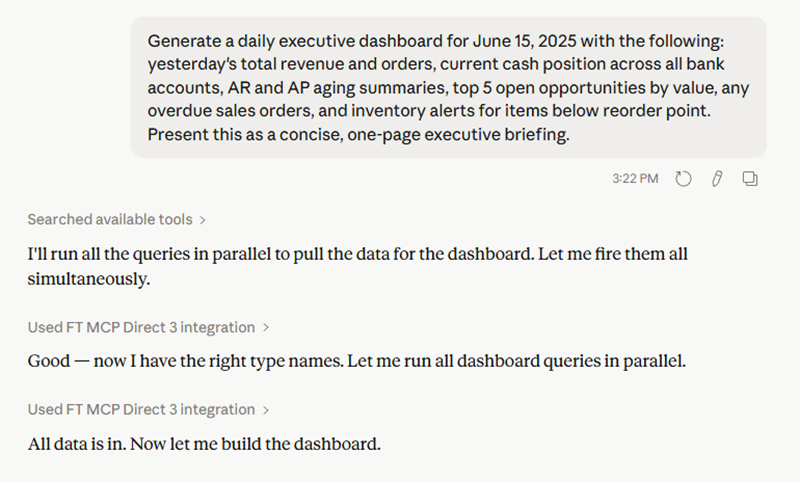
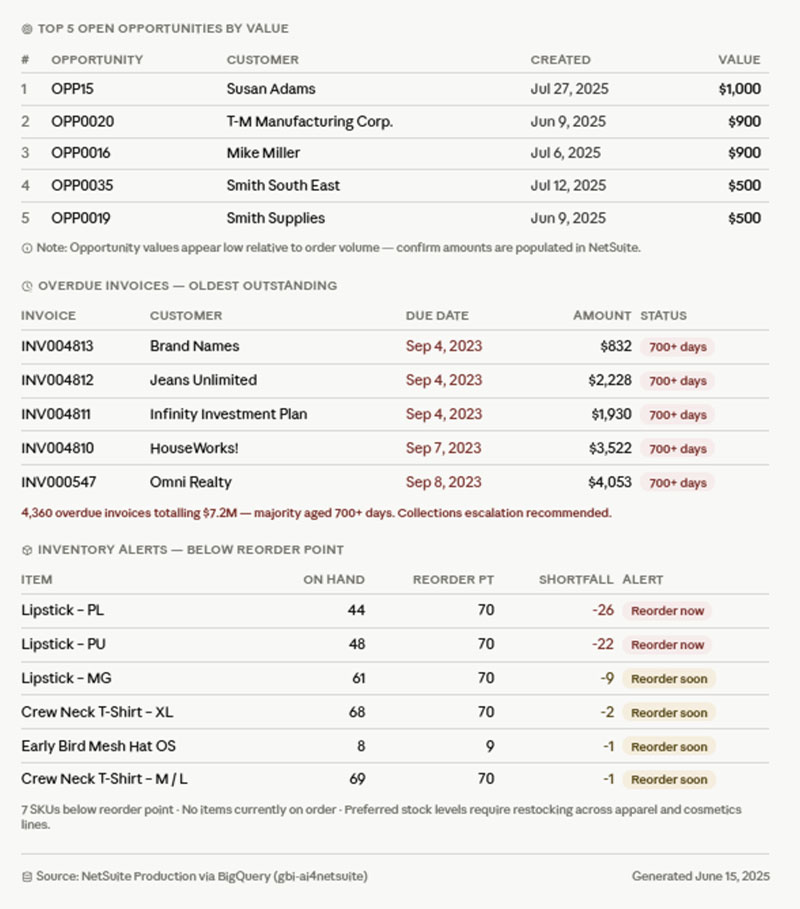
The AI queried the BigQuery warehouse through MCP, ran all queries in parallel, and delivered a formatted briefing within minutes. Here is what it returned from live production data:
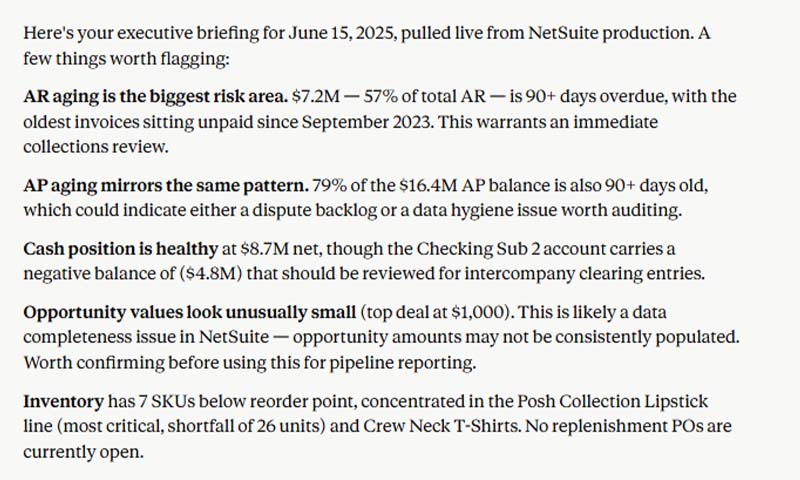
Financial Snapshot. Net cash sits at $8.7M. However, the Checking Sub 2 account currently carries a negative balance of ($4.8M), requiring immediate review for intercompany clearing entries.
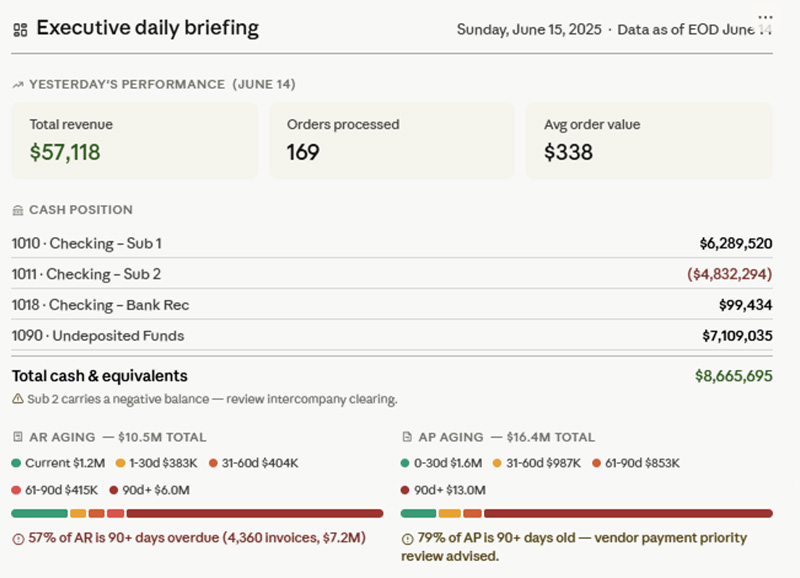
AR Risk (Critical). $7.2M, representing 57% of total AR, is now 90+ days overdue. The oldest invoices have been unpaid since September 2023. Immediate collections review recommended.
AP Mirror Pattern. 79% of the $16.4M AP balance is also 90+ days old. This indicates either a severe dispute backlog with vendors or a data hygiene issue requiring audit.
Pipeline Data Gap. Open opportunity values show unusually small amounts, with the top deal listed at only $1,000. This points to a data completeness issue where opportunity amounts are not being consistently populated by the sales team. Data entry protocols need confirmation before relying on pipeline numbers for forecasting.
Inventory Alerts. 7 SKUs are currently below reorder points. Highest risk: Posh Collection Lipstick line facing a shortfall of 26 units. Crew Neck T-Shirts also falling behind. No replenishment POs are currently open to address these shortages.
For more AI prompt examples across finance, operations, and sales: NetSuite AI Prompt Library
What the AI Dashboard Surfaced That Manual Reporting Would Have Missed
Three findings from this briefing deserve attention because a standard NetSuite reporting workflow would have handled them differently.
The negative bank balance. A ($4.8M) balance on a sub-account is easy to miss when the net cash position shows a healthy $8.7M. A standard cash report showing the aggregate would not flag the sub-account anomaly. The AI surfaced it because it analyzed account-level detail, not just the summary.
The AR and AP mirror. 57% of AR over 90 days and 79% of AP over 90 days is an unusual pattern. Most organizations see one or the other, not both simultaneously. The AI flagged the correlation and noted two possible explanations: a vendor dispute backlog or a data hygiene issue. A standard aging report shows the numbers. It does not suggest the diagnosis.
The pipeline data gap. Instead of presenting inaccurate pipeline numbers as fact, the AI recognized that opportunity amounts at $1,000 were statistically anomalous and flagged a data entry problem. A standard pipeline report would have shown the numbers at face value, leading to a false sense of coverage. The AI caught the data quality issue and recommended verifying entry protocols before using the numbers for forecasting.
Each of these findings would have required a separate investigation in a manual workflow. The AI delivered all three in the same briefing, in minutes.
Building a Daily AI Dashboard Habit for NetSuite Leadership
The compound value of an AI executive dashboard comes from consistency. A one-time briefing is useful. A daily briefing that follows the same format, every morning, changes how leadership operates.
When the team sees the exact same layout every day, they stop spending time figuring out how to read the report and start immediately scanning for anomalies. They know where the cash number lives, where the inventory alerts sit, and where the red flags appear. Pattern recognition becomes automatic.
Once the daily habit is established, the AI can layer in comparisons without adding complexity. "Show me our 90+ day AR compared to last week." "Flag any metric that moved more than 10% since yesterday." Because the data warehouse handles the analytical load, adding these time-series comparisons does not slow the system or require additional report development.
The same single-prompt approach powers AI-driven P&L variance analysis, inventory dead stock detection, vendor performance scorecards, sales pipeline diagnostics, and GL journal entry auditing, all running on the same BigQuery backbone and GURUS AI Data Model.
How GURUS Solutions Can Help
GURUS Solutions has spent 20 years helping NetSuite customers get answers from their ERP data faster. AI4NetSuite was built to make the morning reporting ritual obsolete. The executive dashboard runs on the same architecture that powers every other AI4NetSuite use case: the GURUS AI Data Model, the BigQuery backbone, native Vector Search, and MCP-enabled AI agents.
Talk to an AI Specialist
FAQ
How is this different from NetSuite's native dashboards?
NetSuite dashboards display pre-configured data from within the ERP. AI4NetSuite generates narrative executive briefings from a governed BigQuery warehouse, pulling multiple data dimensions in parallel, flagging anomalies with contextual analysis, and delivering the output in plain English. Native dashboards show numbers. AI4NetSuite explains what the numbers mean and what to do about them.
Can I customize what the daily briefing covers?
Yes. The briefing content is defined by the prompt. You can include or exclude any data dimension: cash, AR/AP, revenue, pipeline, inventory, project profitability, headcount, or any other data available in the warehouse. Different executives can run different prompts tailored to their role.
Does the AI catch data quality issues?
Yes. As demonstrated in the June 15 briefing, the AI recognized that pipeline opportunity amounts were statistically anomalous and flagged a likely data entry problem rather than presenting inaccurate numbers as fact. This self-auditing behavior extends to any data dimension where the AI detects patterns inconsistent with expected norms.
How is this different from NetSuite's native duplicate detection?
NetSuite includes basic duplicate detection for certain record types, but it relies primarily on exact or near-exact field matching. AI4NetSuite's approach uses machine learning to analyze patterns across multiple fields and transaction histories, catching duplicates and anomalies that native tools miss. It also provides continuous monitoring rather than point-in-time checks, and prioritizes issues by financial impact.
Can we add external data to the dashboard?
Yes. Because AI4NetSuite runs on BigQuery, the executive briefing can incorporate data from CRM, marketing, logistics, HR, or any other system connected to the warehouse. A morning dashboard that includes NetSuite financials alongside Salesforce pipeline and HubSpot marketing metrics is a single prompt away.
Will this slow down our NetSuite instance?
No. All queries run in BigQuery. The production NetSuite environment is completely unaffected.